

Search for “customer feedback tools for PLG” or “product-led growth tools” and you usually get a listicle. Fifteen tools crammed into categories like analytics, onboarding, CRM, and feedback. Feedback always gets the shortest section. Two sentences, maybe three. A logo, a pricing link, and on to the next category.
That is backwards.
Analytics tells you what users do. Onboarding shapes their first session. CRM tracks the deal. But feedback is the only category that talks back. It tells you why a user activated, why they stayed, and why they are ready (or not) to expand. Every other tool category is downstream of that understanding.
Most PLG tools articles treat feedback as a checkbox. This article treats it as the engine. I will walk through what feedback to collect at each PLG stage (activation, retention, expansion), what makes a feedback tool actually fit a product-led model, and which tools handle this well today.
If you are mapping out a broader PLG stack, analytics, onboarding, and lifecycle messaging tools still matter. This page stays focused on customer feedback tools because feedback explains the behavior those other categories only measure. If you are still deciding which survey category fits your product, read our guide to types of survey tools for SaaS.
If you have read our guide on the 6 essential feedback surveys every SaaS should run, you already have the building blocks — this article shows where each one fits in a PLG motion.
Feedback is the connective tissue most PLG stacks are missing. Map feedback collection to three stages (activation, retention, expansion), choose tools based on in-app capability and targeting precision, and build closed-loop workflows that turn responses into product decisions.
- PLG requires feedback at three stages: activation (intent and friction), retention (satisfaction and churn signals), expansion (advocacy and feature demand)
- In-app, contextual surveys outperform email surveys because response rates are 3-5x higher and data ties directly to product behavior
- The best customer feedback tools for PLG combine targeting, branching, and analytics not just question delivery
- Survey fatigue is the top risk in a self-serve model. Solve it with contextual triggers, resurvey windows, and a global survey cooldown
- A dedicated feedback tool beats a platform add-on for teams building serious feedback loops across all three PLG stages
Why Feedback Is the Most Underrated PLG Tool Category
Every PLG stack includes analytics. Most include onboarding. Very few treat feedback as a first-class category.
The result is a blind spot. Analytics shows you that 40% of trial users drop off after day three. It does not tell you why. Onboarding guides users toward activation. It does not confirm they found what they came for. CRM flags an expansion opportunity based on usage patterns. It does not surface what the user actually wants next.
Feedback fills every one of those gaps. And in a product-led model, where there is no sales call to ask questions and no CSM to probe for pain, in-product surveys are often the only way to hear directly from users at scale.
The companies that build structured feedback loops across their PLG funnel do not just collect data. They make faster product decisions, catch churn signals earlier, and identify expansion opportunities that usage data alone would miss. That is what separates feedback from a “nice to have” to the category that quietly powers everything else.
The PLG Feedback Loop: What to Collect at Each Stage
Most articles list feedback tools without connecting them to outcomes. Here is the framework that makes feedback actionable in a PLG model.
| PLG Stage | Feedback Goal | Survey Types | Timing |
|---|---|---|---|
| Activation | Capture intent, identify friction | User intent, onboarding friction, first-value confirmation | First session through first week |
| Retention | Surface satisfaction, detect churn risk | NPS, CSAT, feature satisfaction, churn exit | Recurring (30/60/90 day cycles) |
| Expansion | Identify advocates, uncover unmet needs | NPS follow-up, feature requests, PMF survey | After key milestones, quarterly |
Activation Stage: Capture Intent and Friction
The activation stage is where most PLG companies lose users silently. Someone signs up, clicks around, and leaves. You see the drop in your funnel chart but you have no idea what went wrong.
Three types of feedback close this gap:
User intent surveys catch users in their first session and ask what they came to do. The question is simple: “What is your primary goal with [product]?” The answers segment your user base by intent from day one. You learn whether someone signed up for feature A but landed on feature B. That mismatch kills activation faster than any UX issue.
Pulseahead’s user intent survey template gives you a ready-to-use starting point — pair it with URL targeting to show the survey right after signup or on the specific pages where intent matters most.
Onboarding friction surveys target users who stall. If someone starts a setup flow but does not complete it, a short survey (“What stopped you from finishing setup?”) with 3-4 answer options surfaces the friction that your session recordings miss. I have found that the answers here are rarely what you expect. Teams assume it is a UX problem. Users say they could not find the right integration or did not understand the pricing model.
First-value confirmation asks whether the user found what they needed after completing a key action. “How helpful was this feature?” with a simple rating step confirms activation or flags a near-miss.
For a deeper look at trial-stage feedback, see how to use feedback from trial users to improve conversion. And if you are benchmarking your trial performance, our breakdown of trial-to-paid conversion benchmarks gives useful context.
Retention Stage: Surface Satisfaction and Churn Risk
Retention feedback is where most teams start (and stop). They set up an NPS survey, send it quarterly, and call it done. That approach misses most of the signal.
Effective retention feedback requires three layers, each with different timing:
NPS on a recurring cadence tracks the trend, not just the number. A one-time NPS score tells you very little. NPS measured every 90 days, with resurvey controls that prevent the same user from being asked twice within a window, shows you the direction your product relationship is heading. Pulseahead’s resurvey settings and built-in analytics dashboard make this easy to run without building custom logic. Start with the NPS survey template.
CSAT after key interactions catches satisfaction at the moment it forms. Post-support, post-feature-release, post-billing-event. Each of these touchpoints shapes how a user feels about your product, and you only learn their reaction if you ask right then. The CSAT survey template handles this out of the box.
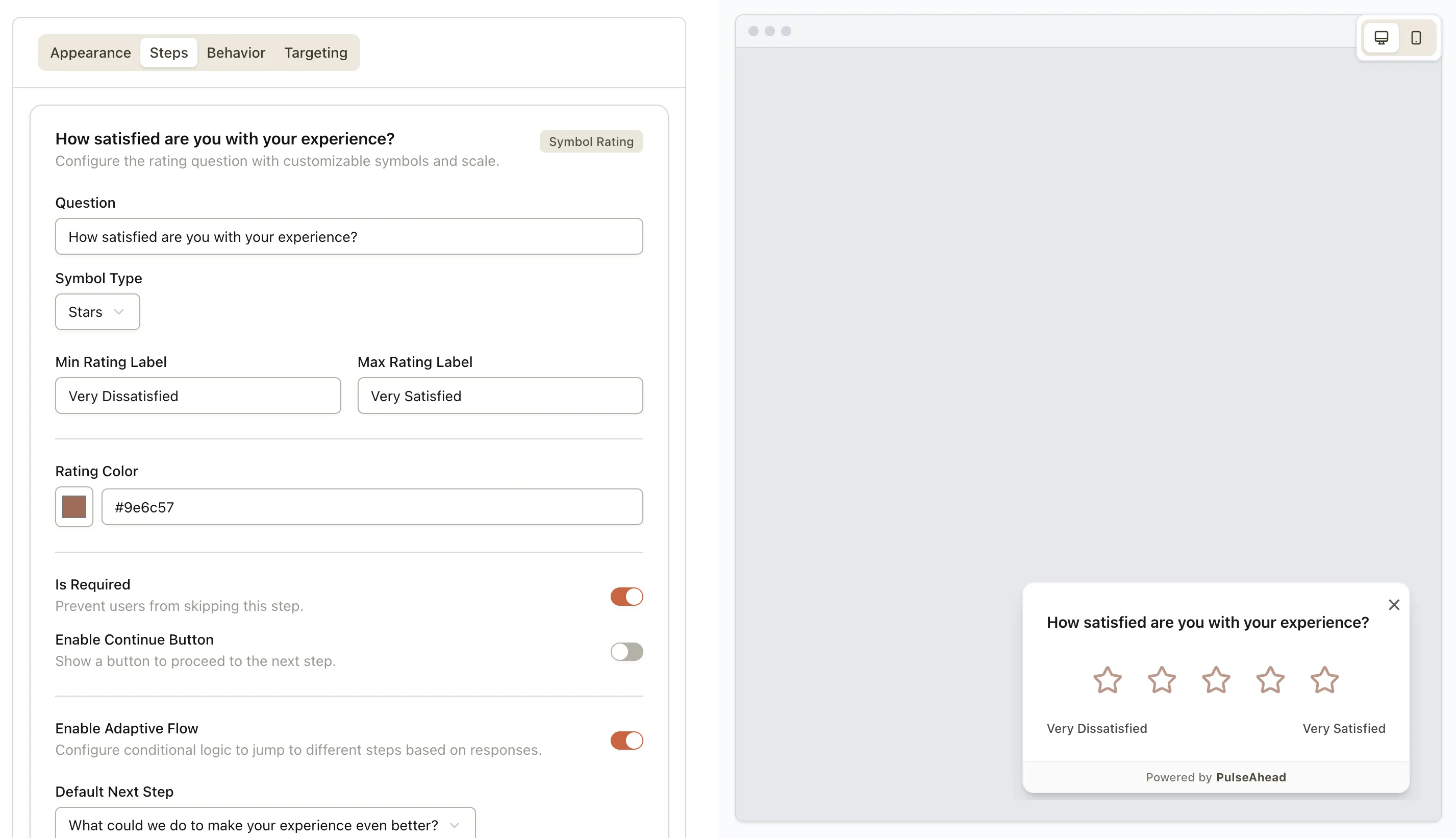
CSAT survey builder with rating step
Churn exit surveys capture the most actionable signal of all: the real reason a user leaves. The churn exit survey template is designed to appear when a user initiates plan cancellation — that is the moment they are most willing to explain what went wrong, and the moment when their answer can still influence your product roadmap or save the account. Keep in mind that in-product surveys only reach users who are actively logged in. If someone has quietly stopped using your product, they are not in the app to see a survey — email-based outreach or exit interviews are more effective for re-engaging lapsed users.
The timing matters more than the question type. I have seen teams run NPS monthly and wonder why response rates drop to single digits. I have also seen teams run it once a year and miss six months of declining sentiment. The sweet spot for most SaaS products is quarterly NPS, contextually triggered CSAT, and churn surveys at the moment of cancellation.
For a full playbook on using surveys to reduce churn, see catching churn before it happens.
Stop guessing. Discover what drives your users with Pulseahead.
Expansion Stage: Identify Advocates and Unmet Needs
This is where most PLG feedback strategies stop. They cover activation and retention but miss the stage where feedback directly drives revenue growth.
Three feedback signals predict expansion readiness:
High NPS respondents are your best expansion targets. Users who score you 9-10 on NPS are not just satisfied. They are signaling willingness to go deeper. Follow up with specific questions: “Which features would you like to see next?” or “Would you recommend us for [adjacent use case]?” These responses tell you exactly what upsell path to pursue.
Feature request patterns reveal demand before you build. When multiple users from the same segment request the same capability, that is not just feedback. That is a market signal. A feature discovery survey surfaces these patterns systematically instead of relying on scattered support tickets.
PMF survey scores indicate expansion readiness. If a user segment scores above 40% on the “very disappointed” question, they are locked in. That is the segment to target with premium features, additional seats, or higher tiers.
The gap in most PLG stacks is that expansion decisions rely entirely on usage data. Usage tells you someone is active. Feedback tells you they are ready to buy more. Combining both, through surveys triggered after usage milestones, gives you a complete picture that neither data source provides alone.
What Makes a Feedback Tool “PLG-Ready”
Not every survey tool fits a product-led model. A tool designed for email marketing surveys or annual employee engagement surveys will fight you at every step when you try to run contextual, in-product feedback at scale.
Here are the six criteria that separate a PLG-ready feedback tool from a generic one:
| Criteria | Why It Matters for PLG | What to Look For |
|---|---|---|
| In-app deployment | PLG users live inside your product, not in their inbox | Native widget or lightweight SDK, not email-only |
| Behavioral targeting | Right survey to the right user at the right time | Target by URL, event, user property, or segment |
| Survey branching | Adaptive flows based on responses | Conditional logic, skip patterns, follow-up questions |
| Built-in analytics | Act on data without exporting to a spreadsheet | Response dashboards, trend tracking, segment filtering |
| Low-friction setup | PLG teams move fast and iterate constantly | No-code builder or fast SDK integration |
| Resurvey controls | Prevent fatigue in a self-serve environment | Frequency caps, initial delay settings, response limits, global survey cooldown periods |
Pulseahead checks every box on this list. Full design customization so surveys feel native to your product. Targeting by URL, session count, days since signup, and manual trigger. Survey branching with conditional logic. A built-in analytics dashboard. No-code setup with AI-powered survey generation. And resurvey controls that prevent fatigue without sacrificing coverage.
For a broader overview of how different survey tool categories compare, see types of survey tools for SaaS.
Best Customer Feedback Tools for PLG (Product-Led Growth)
This is not a listicle of 17 tools across 6 categories. Every customer feedback tool below is evaluated specifically for PLG: in-app survey delivery, targeting, branching, analytics, and fit for a self-serve product model.
If you were expecting a broader PLG tools roundup, treat this as the feedback layer in that stack. Analytics tools tell you what users did. Onboarding tools help move them forward. Customer feedback tools tell you why they stalled, what they needed, and what would make them stay.
| Tool | In-App Surveys | Targeting | Branching | Analytics | Starting Price | PLG Fit |
|---|---|---|---|---|---|---|
| Pulseahead | Yes (widget) | URL, session count, days since signup, manual trigger | Yes | Built-in dashboard | Free (100 responses/mo), paid from $48/mo | Purpose-built |
| Refiner | Yes (widget) | URL, segment, attribute, event | Yes | Basic dashboard | Free (25 responses/mo), paid from $99/mo | Strong |
| Survicate | Yes + email | URL, event, attribute | Yes | Reporting + integrations | Free (25 responses/mo), paid from $89/mo | Strong |
| Hotjar Surveys | Yes (widget) | URL, behavior | Limited | Heatmap integration | Free (100 responses/mo), paid surveys from $99/mo | Moderate |
| Userpilot | Yes (native) | Segment, event | Yes | Product analytics suite | $249/mo | Strong (bundled) |
| Pendo Feedback | Yes (native) | Segment, guide-based | Limited | Product analytics suite | Custom pricing | Moderate (bundled) |
Pulseahead is purpose-built for in-app feedback in SaaS. Lightweight SDK, AI-powered survey generation, full design customization, and a built-in analytics dashboard. Covers NPS, CSAT, PMF, and custom survey types with URL-based targeting, session count and days-since-signup triggers, resurvey controls, and a global survey cooldown. Best fit for teams that want dedicated feedback without paying for a full product experience platform.
Refiner focuses specifically on in-app micro-surveys for SaaS. Strong targeting by URL, segment, attributes, and events. Good for teams that want a focused survey tool without onboarding or analytics features. Free plan available (25 responses/month); paid plans from $99/month.
Survicate offers both in-app and email surveys with solid targeting and branching. The integration ecosystem is broad (Intercom, HubSpot, Slack). Good for teams that need multi-channel feedback. Free tier available for basic usage.
Hotjar Surveys pair well with heatmaps and session recordings but the survey targeting and branching are more limited than dedicated tools. Better for early-stage teams already using Hotjar for UX research who want to add basic in-app surveys without another vendor.
Userpilot includes survey functionality as part of a broader product experience platform (onboarding, analytics, engagement). Survey capabilities are solid but you are buying the full platform. Makes sense if you need onboarding tools and surveys together. Starts at $249/month.
Pendo Feedback is part of Pendo’s enterprise product experience suite. Feedback collection integrates with their guide and analytics system. Strong for large teams already using Pendo. Feedback capabilities alone are not the primary value proposition, and pricing requires a custom quote.
Do You Need a Dedicated Feedback Tool or a Platform?
If feedback is a secondary need and you are already paying for Userpilot or Pendo, their built-in survey features may be enough. But if you are building a serious feedback program across all three PLG stages, a dedicated tool gives you better targeting, more survey types, and lower cost per survey than a platform where surveys are one feature among twenty.
Avoiding Survey Fatigue in a Self-Serve Product
Survey fatigue is the silent killer of PLG feedback programs. Your users chose a self-serve product because they value their time. Interrupt them with poorly timed surveys and you damage the experience you are trying to measure.
Here is how to run feedback at scale without annoying your users:
Use contextual triggers, not random ones. Show a survey because the user just landed on a specific page, reached a meaningful milestone in their session count, or hit a threshold of days since signup — not because a calendar reminder fired. URL-based triggers and time-based conditions (days since signup, session count) let you attach surveys to moments that matter. A survey shown at the right moment feels like a natural conversation; a survey that appears out of nowhere feels like an interruption.
Set resurvey windows. If a user answered your NPS survey, do not ask again for 90 days. If they dismissed a survey, wait at least 30 days before showing another one. Most PLG-ready feedback tools offer initial delay and resurvey settings that handle this automatically, preventing the “not another popup” reaction.
Use a global survey cooldown. Rather than manually coordinating which surveys overlap, configure a global cooldown period at the account level. Once a user interacts with any survey, the cooldown kicks in and prevents any other survey from showing until the window clears. Pulseahead handles this with a single global config setting — no per-survey logic required.
Keep surveys short. One to three questions. That is the format for in-app feedback in a PLG model. If you need more depth, use branching to ask follow-up questions only to users who give specific responses. Most users see two questions. Users with interesting responses see four. Nobody sees ten.
Place surveys contextually. A CSAT survey after a support interaction makes sense. The same survey appearing on the dashboard for no reason does not. Match the survey to the moment.
The goal is not to collect less feedback. It is to collect smarter feedback. Five well-targeted micro-surveys that each get 30%+ response rates are worth more than one blast survey that gets 5%.
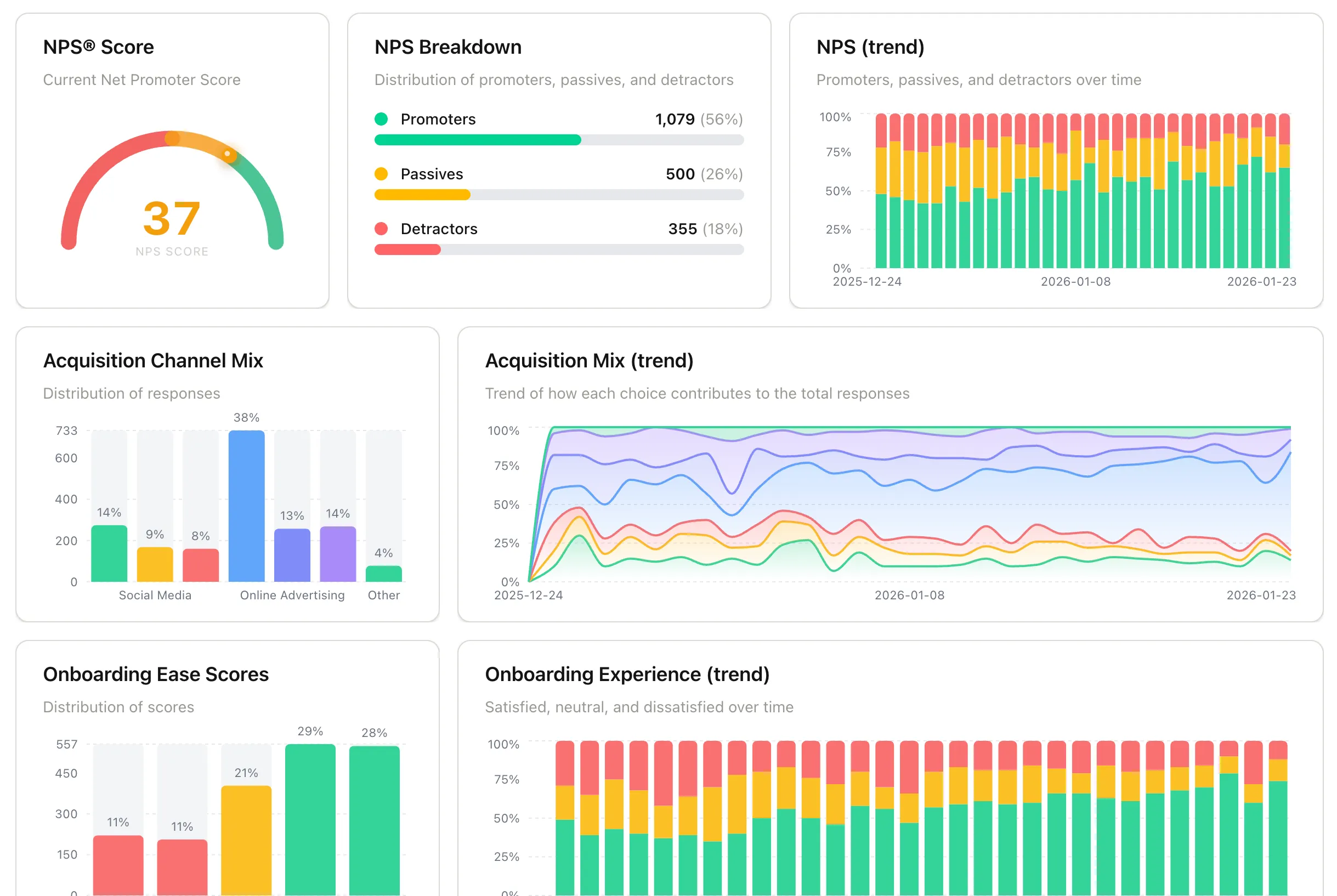
Track response rates and trends across all active surveys on Pulseahead
Frequently Asked Questions
What is the difference between product analytics and feedback tools in a PLG stack?
Product analytics (Mixpanel, Amplitude, PostHog) tracks what users do: clicks, flows, feature usage, drop-off points. Feedback tools capture why they do it: motivations, frustrations, unmet needs. Analytics tells you that 35% of users abandon the setup wizard at step 3. A feedback survey at that step tells you they could not find the right integration. You need both, but they answer different questions. If you are still choosing the right survey category before picking vendors, start with types of survey tools for SaaS.
Are customer feedback tools the same as product-led growth tools?
Not exactly. Product-led growth tools is a broader bucket that can include product analytics, onboarding, lifecycle messaging, experimentation, and feedback. This article is intentionally narrower: it focuses on customer feedback tools for PLG teams because that is the layer that captures user intent, friction, satisfaction, and expansion demand directly inside the product.
Can I use a standalone survey tool like Typeform for PLG feedback?
You can, but the tradeoffs are steep. Standalone tools require email distribution, which drops response rates significantly compared to in-app surveys. They also disconnect responses from product behavior, so you cannot target surveys based on what a user just did. For occasional research surveys, Typeform works fine. For ongoing PLG feedback loops, you need a tool that lives inside your product.
How many surveys should I run simultaneously in my product?
One at a time per user is the right target. You can have multiple surveys active in your account, each scoped to different URLs or triggered at different points in the user journey. But no individual user should encounter more than one survey per session. The cleanest way to enforce this is a global survey cooldown period configured at the account level — once a user sees or responds to any survey, the cooldown blocks all others until the window expires. This removes the need to manually coordinate survey targeting rules across every survey you run.
What response rate should I expect from in-app surveys versus email surveys?
In-app surveys typically see 10-30% response rates depending on placement, timing, and length. Email surveys for SaaS products average 5-15%. The gap widens as survey length increases. A one-question in-app survey can hit 30%+ easily. A ten-question email survey might get 3%. This is why in-app, micro-survey formats dominate PLG feedback.
How do I act on feedback without a dedicated customer success team?
Automate the obvious loops first. Route low NPS scores to Slack or your support tool so someone can follow up within 24 hours. Tag feature requests by theme and pipe them into your roadmap tool. Set up alerts for churn-risk keywords in open-text responses. You do not need a CSM team to close feedback loops. You need workflows that route signals to the people who can act on them.
Should I collect feedback from free-tier users or only paying customers?
Both, but with different questions. Free-tier users tell you about activation friction, intent mismatches, and what would drive them to upgrade. Paying customers tell you about satisfaction, retention risk, and expansion readiness. Skipping free users means missing the top of your PLG funnel. Skipping paid users means missing churn signals and growth opportunities.
What is the best way to share feedback data with my product team?
Build a feedback review cadence, not a dashboard nobody checks. A weekly 15-minute review of new survey responses, filtered by theme or segment, is worth more than a real-time dashboard that goes stale. Pipe tagged responses into Slack channels by category (bugs, feature requests, praise). Include verbatim quotes in sprint planning. Feedback is most useful when it reaches the people building the product, not when it sits in an analytics tool.
How do I measure if my feedback program is actually improving PLG metrics?
Track two things: response rates (are you getting enough signal?) and action rates (are you doing something with it?). A feedback program that generates hundreds of responses but no product changes is just noise collection. Connect specific feedback-driven changes to outcome metrics. "We added X feature based on survey data. Activation rate for that segment increased from 22% to 31%." That is how you prove feedback works.
Build Feedback Loops That Actually Drive Growth
You do not need a different tool for each PLG stage. You need one feedback tool that handles targeting, timing, and analysis well enough to cover activation, retention, and expansion from a single platform.
That is what Pulseahead is built for. In-app surveys with behavioral targeting, resurvey controls, branching logic, and analytics. No heavy platform to configure. No email distribution to manage. Just contextual feedback where your users already are.
Build better products with real, contextual user feedback.