

Trial users have already solved your biggest marketing problem: they believe your product might solve their problem. They’ve signed up. They’re in. What they do next depends entirely on whether your trial experience proves your product actually delivers. Yet most companies fumble here. They let trial users slip through their fingers without understanding why. Collecting and acting on feedback from trial users isn’t optional if you want higher conversion rates. It’s the difference between guessing and knowing exactly what stops people from becoming paying customers.
Why Trial User Feedback Is Your Untapped Goldmine
Trial users represent a unique opportunity that most companies waste. These aren’t casual browsers or marketing-qualified leads. These are people who’ve already committed time to exploring your product. They want to see value. The challenge is that they often disappear without leaving a trace.
The brutal truth is straightforward: trial users who don’t convert hold critical insights about your product. They’ve identified friction points you can’t spot from metrics alone. They’ve hit walls that analytics dashboards won’t reveal. But here’s the thing that most product teams get wrong, they assume that if users aren’t converting, it’s a product problem. Sometimes it is. Often it’s not. It’s a perception problem, an onboarding problem, or a clarity problem. Feedback tells you which one, and without it, you’re flying blind.
Research shows that 54% of successful SaaS companies actively track user behavior and collect feedback during trials to understand drop-off patterns. These companies don’t leave conversion rates to chance. They build feedback collection into their trial experience and use it to make deliberate, data-driven improvements. The companies that don’t? They’re stuck iterating on assumptions.
The Timing Problem: Why You Can’t Wait
Here’s the mistake most teams make: they wait too long to ask for feedback. A user finishes their trial or abandons mid-way, and your company sends an email asking what went wrong. By then, the user has moved on. They’ve already decided your product isn’t for them. Their frustration has faded. Their context is gone.
The window to capture real, actionable feedback is narrow. Users need to be asked at the moment of friction, not days later. If someone gets stuck on a feature, that’s your moment to ask why. If they skip a step, ask what confused them. If they complete their first success, ask how they felt about it. Context is everything.
This is where most tools fall short. Generic post-trial surveys miss the mark because they’re generic. A user may not remember exactly why they abandoned onboarding three days ago. But if you ask them in real-time, while they’re experiencing the friction, you get the truth. That’s the feedback that drives conversion improvements.
Step 1: Build Feedback Into Your Trial Experience
You can’t collect feedback after the fact. You need to collect it while users are actively engaging with your product.
In-app feedback at key moments is non-negotiable. After a user completes their first important action, ask them how it went. Use micro-surveys: single-question polls triggered by user behavior. Not long forms. Not multi-step questionnaires. Simple, contextual questions. Examples include “Was this step clear?” or “How helpful was this feature?” Quick yes/no questions or simple emoji reactions work better than open-ended fields when you’re trying to gather feedback at scale without overwhelming users.
The key principle is that feedback collection should feel effortless for users. If asking for feedback creates friction, you’re making the problem worse. Embed feedback buttons directly in your interface. Let users signal frustration or satisfaction with a single click. Use tooltips to ask why someone hesitated before a certain action. The moment a user encounters an error, ask if they need help.
Platforms that support in-product feedback collection make this easier to execute. With a tool like Pulseahead you can set up contextual surveys without requiring developer resources, which means your team can iterate on feedback mechanisms as quickly as they learn what works.
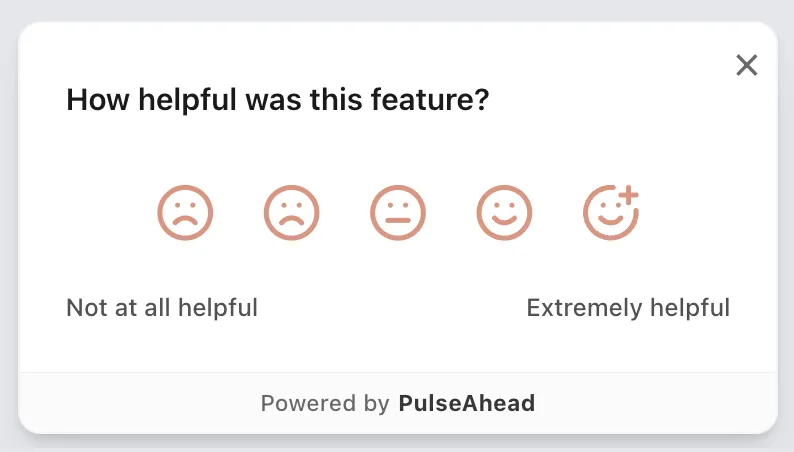
How Helpful Was Feature Survey Example using Pulseahead
Step 2: Ask for the Right Feedback, Not Everything
Volume of feedback doesn’t equal quality. In fact, too many feedback requests backfire. Users get survey fatigue. They start ignoring your feedback prompts. Then you get worse data from the few responses you do get.
Be strategic about what you ask and when you ask it. Segment your users and tailor your questions. A user who completed onboarding needs different feedback than a user who bounced mid-way. A power user exploring advanced features needs a different question than someone still trying to understand basics.
Consider this approach: early in the trial, ask qualifying questions about what the user hopes to achieve. Use those answers to segment them. Then, throughout their trial, ask feedback questions tailored to their specific journey. If someone’s goal was “streamline my workflow,” and they explore your workflow feature but don’t return to it, ask them specifically what was missing. If someone activated a feature but only once, ask if it delivered on expectations.
Open-ended questions are valuable, but they’re expensive to analyze at scale. Combine them strategically with quantitative feedback. Use rating scales, multiple choice, and yes/no questions to capture broad patterns quickly. Then, use open-ended follow-ups sparingly to dig into specific areas where quantitative data reveals gaps.
Here’s the formula: collect quantitative feedback from everyone, but only ask for qualitative details from specific segments where it matters most. This keeps your feedback workload manageable while ensuring you capture the insights that actually drive conversion improvements.
Build better products with real, contextual user feedback.
Step 3: Identify Where Users Get Stuck
Friction points aren’t always obvious. A user might not churn because your product is bad. They churn because they couldn’t figure out how to do something in the first 10 minutes. Or they got value from one feature but never discovered the feature that would have sealed the deal.
Use behavioral data combined with feedback to map where users disengage. Look at your analytics: which onboarding steps have the lowest completion rates? Which features are explored but rarely used again? Where do users spend the most time without taking action? These are your friction zones. Then, layer feedback on top. Ask users who dropped off at a specific step why they left. Ask users who used a feature once why they didn’t return.
This is where patterns emerge. You might discover that users find your core feature valuable but get confused by your pricing page. Or they love the feature but don’t understand your integrations option. Or the onboarding takes too long, so they skip it and hit problems later. Each of these is a different conversion blocker, and each requires a different fix.
The mistake is treating all drop-offs as the same. They’re not. Users drop off for different reasons, and your feedback collection needs to be targeted enough to surface those differences.
Step 4: Close the Loop
Collecting feedback is useless if you don’t act on it. This is the step that separates companies with 20% trial-to-paid conversion rates from those with 30% or higher. They don’t just collect feedback. They implement it, then communicate the improvements back to users.
When you act on feedback, tell users about it. Send an in-app notification: “You asked for easier navigation in our dashboard, and we’ve delivered a streamlined design.” This builds trust and encourages more feedback in the future. Users feel heard, which makes them more likely to stick around.
Prioritize your improvements based on both impact and effort. Use a simple framework: changes that help many users with reasonable effort to implement go first. Quick wins matter. If you discover that 30% of trial users find your onboarding confusing, and you can simplify it in a day, do it. Don’t wait for the perfect solution. Iterate quickly based on feedback, then collect more feedback to see if your changes worked.
Making Feedback Collection Sustainable
The biggest challenge with trial user feedback is making it sustainable. Your team can manually reach out to a few trial users, but what happens when you’re onboarding 100 per week? 1,000 per month? Feedback collection needs to scale without requiring more headcount.
Embedded survey tools make this possible. You can set up automated feedback prompts triggered by user behavior. A survey asking about confusion automatically appears when a user re-visits the same step three times. A satisfaction check triggers after a user completes an important milestone. You gather feedback continuously, at scale, without manual intervention.
Analytics dashboards help you identify patterns across hundreds or thousands of responses. Instead of reading individual feedback manually, you can see themes emerge. You spot the top 3 reasons users churn, the top 2 confusing onboarding steps, and the 1 missing feature request that keeps coming up.
This combination of automated feedback collection, behavioral triggers, and analytics dashboards transforms trial feedback from a manual, time-intensive process into a sustainable system that informs product decisions month after month. Pulseahead’s analytics are designed to surface these insights automatically, helping you spot trends without digging through raw data.
The Conversion Impact
Companies that systematically collect and act on trial user feedback see measurable improvements. When users reach their first “aha moment” faster because onboarding is clearer, conversion rates go up. When pricing objections are addressed earlier because you know users are hesitant, conversions improve. When users discover the feature that justifies your product before their trial ends, they’re more likely to convert.
The impact isn’t just immediate. Better trial experiences compound over time. Converted users who had a smooth trial are more likely to stick around, less likely to churn, and more likely to recommend your product to others. A 5% improvement in trial-to-paid conversion rate translates into meaningful revenue growth across your entire customer lifecycle.
Skip the guesswork. Start with ready-made Pulseahead templates.
Start Your Feedback Loop Today
Trial feedback is the lever that unlocks faster conversion growth. You have the data already. Users are telling you what works and what doesn’t. The question is whether you’re listening.
Set up simple in-product feedback prompts at key moments in your trial. Ask targeted questions about specific friction points, not generic satisfaction. Act on what you learn and communicate improvements back to users. Iterate. Then do it again next week with fresh data.
If you’re serious about improving trial conversion, stop guessing. Start listening. Your trial users will tell you exactly what needs to change. They always do.