

Recruiting research participants usually gets treated like a separate workflow from the product itself. Export a customer list. Send an email. Ask sales or support for names. Post in a community. Wait for replies from people who may or may not remember the moment you want to study.
That can work, but it often loses the product context that made the research important in the first place.
If you want to understand why trial users abandon setup, why admins hesitate before inviting teammates, or why customers keep returning to the same workflow, the best moment to invite them is often inside the product. They are already there. The task is fresh. The ask can be small, specific, and optional.
In-app research recruiting is not about showing a generic “talk to us” prompt to everyone. It works best when you target the right audience, make the invitation easy to decline, and give qualified users one clear next step.
In-App Research Recruiting Finds Users While the Context Is Fresh
The strongest research participants are often the users currently experiencing the workflow you want to understand.
An email sent two weeks after onboarding asks someone to reconstruct what happened. An in-app prompt shown after setup asks while the sequence is still fresh. The same is true for pricing pages, cancellation flows, feature launches, integration setup, repeated workflows, or any product moment where the team needs sharper context.
That does not mean every research ask should be automated from behavior alone. Some moments are better controlled by your app logic. If a user hits a custom product state, your app can use a manual SDK trigger to show the prompt. If the moment is tied to URL, device, session count, days since signup, or known user traits, audience targeting can keep the prompt scoped.
The goal is simple: invite the right users into a voluntary research path without interrupting everyone else. A good in-app prompt feels like a relevant invitation, not a marketing pop-up wearing a research badge.
Pulseahead is built around this kind of in-product survey: web and mobile-web delivery, URL targeting, user attributes, segments, behavior controls, and manual triggers when the product needs exact control over the moment.
Start With the Research Question, Then Choose Who Should See the Ask
Do not start by writing the prompt. Start with the decision you are trying to make.
“Talk to product” is too broad. “Why do trial users abandon integration setup?” gives you a recruitable audience, a product moment, and a reason someone might be willing to help. The narrower the research question, the easier it is to decide who should see the ask.
| Research question | Better audience choice | Product moment to use |
|---|---|---|
| Why do trial users abandon setup? | New trial users in their first week | After setup friction, skipped steps, or repeated visits |
| Why are admins not inviting teammates? | Identified admins on team plans | Team settings, invite screen, or empty collaborator states |
| Why are customers hesitating before upgrading? | Users on a free or starter plan with usage depth | Pricing page, upgrade modal, or feature-limit experience |
| Why is a feature not becoming a habit? | Users who have tried the feature but do not return | After a feature interaction or via app-controlled trigger |
| Why are enterprise accounts asking for help? | Users from large accounts or specific customer segments | Support-heavy workflows or account-specific product paths |
Segments and user attributes are the cleanest way to make this practical. If your app already knows a user’s plan, role, signup date, company size, lifecycle stage, or account type, pass those traits through the SDK and create user segments. Then the research invitation can be shown only to the users who fit the study.
You can still add a short screener when the study needs a tighter participant type. Just avoid making the screener do work that targeting could have handled upfront. If you need admins on Pro plans, target admins on Pro plans. Save the in-survey question for information that genuinely affects the next step.
Also watch for convenient bias. Power users are easy to recruit because they already care. Frustrated users are easy to notice because their feedback is loud. Both can be useful, but only if they match the research question.
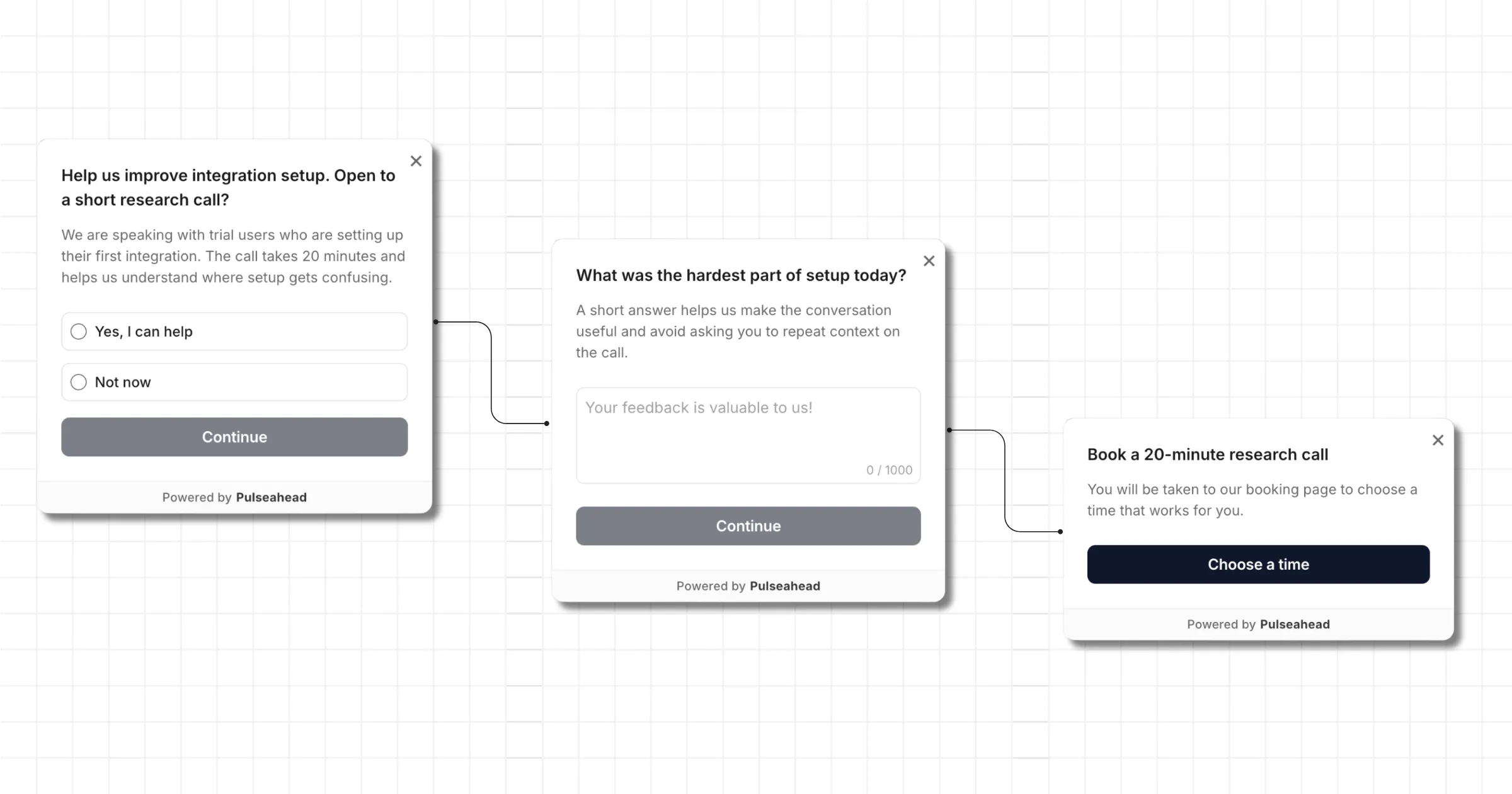
User Research Recruitment Example using Pulseahead
Two Ways to Capture Research Interest In-App
There are two practical ways to capture research interest inside the product.
The first is a simple opt-in path. Ask whether the user is open to a short call, collect a yes or no answer, and review interested users later. The second is a CTA path. Ask qualified users to book a slot, complete an intake form, or open a research consent page immediately.
| Workflow | Use when | Example step | Tradeoff |
|---|---|---|---|
| Choice-step opt-in | You want to review candidates before outreach | ”Open to a 20-minute call about setup?” with Yes and No choices | Lower friction, but the team still needs to follow up |
| CTA-based booking | You want qualified users to act immediately | Button to Calendly, Cal.com, SavvyCal, Typeform, or intake page | Faster scheduling, but the ask needs stronger context |
| CTA-based consent | The study needs explicit terms before booking | Button to a consent page or research intake page | Cleaner handoff, but it adds one more external step |
| Follow-up from reviews | You want to invite users after reading signals | Tag matching responses, then contact or target a later prompt | Better context, but less immediate than an in-flow ask |
The yes or no path works well when the research team wants to review users before contacting them. Maybe the team needs a mix of accounts, roles, or use cases. Maybe the product manager wants to read the response first. A simple choice step keeps the initial ask light.
The call-to-action step works better when the next action should happen outside Pulseahead. That could be a booking link, a Google Form, a Typeform intake, a HubSpot meeting link, or a custom research page. In Pulseahead, CTA steps support a markdown description and a button leading to the URL your team chooses, which makes the handoff clearer than dropping a naked link into the prompt.
The copy matters more when you use a CTA. Explain why the user is being invited, how long the call or study takes, and what happens after clicking. Users should never have to guess whether they are booking a support call, joining a paid study, or volunteering for product research.
Recruit users while the context is fresh.
Add Screening Without Turning the Prompt Into a Survey Project
A research recruiting prompt should stay short. If the flow starts feeling like a full survey, fewer users will make it to the next step.
Use this order:
- Choose the audience with targeting first. Use URL rules, segments, user attributes, session count, days since signup, or a manual trigger depending on the product moment.
- Start with the invitation or one qualifying question. The first screen should tell the user why they are being asked.
- Add one screener only when the team still needs information that is not already known from user attributes.
- Use long text only when the answer changes whether the user should be invited or helps the team prepare for the call.
- Use adaptive flow to show the opt-in or CTA step only to users who match the research criteria.
One qualifier and one opt-in step is usually enough. For example, a team researching onboarding could target users in their first week, show the prompt after a setup milestone, ask one question about the current blocker, then route relevant users to a booking CTA.
If the team already knows the user is an admin on a Pro plan, do not ask them to confirm that in the prompt. Use that context to make the invitation sharper: “We are talking to admins who recently set up billing rules. Open to a 20-minute call?”
Pulseahead can combine choice, long-text, adaptive-flow, and CTA steps in one short flow. The useful part is the control this gives you: keep the recruitment path specific without turning it into a heavy questionnaire.
Write the Ask So It Feels Like an Invitation, Not a Pop-Up Ad
Research invitations fail when they are vague. “Want to talk to us?” gives the user no context, no reason to trust the next step, and no clue how much time you are asking for.
| Weak prompt | Better prompt |
|---|---|
| ”Want to talk to us?" | "Help us improve setup. We are talking to users who connected their first integration this week." |
| "Book a call with our team." | "Open to a 20-minute research call about the integration setup experience?" |
| "Tell us about your feedback." | "You mentioned setup was confusing. Would you be open to a short follow-up so we can understand?” |
For a yes or no opt-in path, keep the question plain:
“Help us improve setup. We are talking to users who connected their first integration this week. Open to a 20-minute call?”
Answers: “Yes, contact me” and “Not now.”
For a CTA path, the screen needs a little more context:
Message: “Help us improve setup”
Description: “We are speaking with users who connected their first integration this week. The call takes 20 minutes, and you can choose a time that works for you.”
Button: “Book a research call”
Consent should be plain too. If clicking the button opens an external booking or intake page, say that. If opting in means the team may contact the user later, say that. Clear expectations make the ask easier to accept and easier to decline.
Use Existing Feedback as a Secondary Recruiting Signal
Existing survey responses can help you decide who to invite next, but they should not be the whole recruiting strategy.
If a user writes that onboarding was confusing, pricing was unclear, or a workflow does not fit their process, that response can point to a useful follow-up. The user has already given a signal, and the team has enough context to ask for a deeper conversation.
This works best as a secondary signal. Review responses in the response feed, use response tags to mark themes such as onboarding confusion or pricing objection, and look at the user timeline when identity is available. Then decide whether to contact the user directly or create a targeted prompt for the same product area.
For example, if several open-text responses mention trouble connecting integrations, the next move may be a targeted in-app recruitment prompt inside the integration setup flow. If a few high-value accounts mention the same missing workflow, the team may tag those responses and invite them into a focused research call.
The important boundary is timing. Existing feedback is useful for finding patterns and candidates. In-app recruiting is useful for asking at the product moment where the research question is strongest.
Building This Workflow in Pulseahead
Here is the practical Pulseahead version of the workflow.
- Create a short in-product survey or prompt around one research topic. Keep the study narrow enough that the user understands why they are being asked.
- Target the prompt using URL rules, user attributes, segments, session count, days since signup, or a manual trigger, depending on the product moment.
- Identify users through the SDK so interested participants can be tied back to your own user records. The identifying users docs show how to pass user ID and traits.
- Add a choice step if you want to collect opt-in interest and follow up later.
- Add one qualifying choice or long-text step only if the study still needs a narrower participant group.
- Use adaptive flow to decide who sees the opt-in, message, or CTA step.
- Use the CTA step when qualified users should book externally, complete an intake form, or open a consent page immediately.
- Use response tags to mark interested users, research candidates, or recurring study themes.
A simple setup-research flow might look like this:
| Step | Example |
|---|---|
| Targeting | New trial users in their first week who reached the integration page |
| Trigger | Manual SDK trigger after the user completes or retries integration setup |
| Question | ”What was hardest about setting up your first integration?” |
| Adaptive flow | Show the CTA only when the answer matches the study criteria |
| CTA | ”Book a 20-minute research call” |
| Response tagging | Mark matching responses as setup-research candidates |
If the team wants a lighter version, skip the booking link and use a yes or no choice step. That gives the team a clean list of interested users to review from the dashboard before outreach.
If the study is ready and the eligibility rules are clear, use the CTA path. A qualified user can move directly from the product moment to Calendly, Cal.com, SavvyCal, HubSpot meetings, a research intake form, or a consent page.
The Best Research Recruiting Flow Is Specific and Easy to Say No To
Good in-app research recruiting is specific about who is being asked and why.
It should also be easy to decline. A research invitation should not block the user from finishing setup, checking billing, inviting a teammate, or doing the work they came to do. The ask is useful because it is contextual, not because it forces attention.
Start with one study. Pick one audience. Choose one next step: collect interest for later review, or send qualified users to a booking or intake flow immediately.
That is enough to make recruiting lighter. Interested users can raise their hand inside the product, and your team gets enough context to follow up without starting from a cold outreach list.
When you are ready to turn those conversations into a repeatable feedback loop, pair the recruiting prompt with feedback analytics, response tags, and user context so the next study starts from a better signal than guesswork.