

Two users sign up for your trial on the same day. One activates, logs in every day, and visits your pricing page twice by day five. The other never comes back after the welcome email.
On day seven, both receive: “You’re halfway through your trial!”
The space between what each user actually needs and what they get is what decision automation for trial-to-paid conversion flows is designed to close. Instead of a fixed calendar sequence that treats every trial user identically, it’s a rules engine that evaluates each user’s actual state and routes them to the right action at the right moment. Different user, different signal, different response.
The concept is simple. Getting it working is where most teams run into trouble.
Time-based trial emails fail because they treat power users and inactive users exactly the same. To fix your conversion rates, switch to behavior-based decision automation using a handful of rules tied to a strict activation milestone. Most importantly, run in-product surveys first to uncover exactly why users stall so your automation delivers the right message at the exact right time.
Four places where trial conversion breaks
Practitioner communities and Chameleon’s conversion guides point to the same bottlenecks across companies of different sizes:
No defined activation event. Teams don’t know which specific in-product action predicts conversion. Without that anchor, every downstream decision is a guess. The average SaaS product activation rate is 36%, meaning nearly two-thirds of signups never reach the point where they experience the product’s core value. Most teams haven’t identified what that point even is.
Churn attribution is guesswork. Most founders are still treating churn diagnosis as a new problem. The standard advice to add PostHog or Amplitude, run cohort analysis, and add a cancellation exit survey describes diagnostic basics, not advanced tactics. The fact it still circulates as new guidance tells you where most teams are starting from.
Sequences run on calendars, not behavior. Day 1, day 4, day 7. Same message to every user regardless of what they’ve done. A user who activated on day one and a user who hasn’t logged in since signup both receive the same “here are some tips” email on day four. One of them doesn’t need tips. The other doesn’t need tips either; they need to know what’s blocking them.
The stack isn’t wired together. CDP, email tool, CRM, and in-app messaging run independently. The email tool doesn’t know what the user did in the product this morning. The CRM doesn’t know the user visited the pricing page twice yesterday. Connecting these so audience segments refresh automatically via API is a known fix, yet it still gets written up as a breakthrough by practitioners who’ve done it. That tells you how common the fragmented stack problem remains.
Sounds familiar?
I'm talking to SaaS founders and PMs working through exactly this. Book a free 30-min call to share what's not working. I'll share what I'm learning across companies in return. No pitch, no product to sell.
Conversion timing: front-load everything
ChartMogul’s Go-to-Market data shows conversions peak in week one and spike again in the final 48 hours before trial expiry. The middle of a 14-day trial is a relative dead zone for conversion intent.
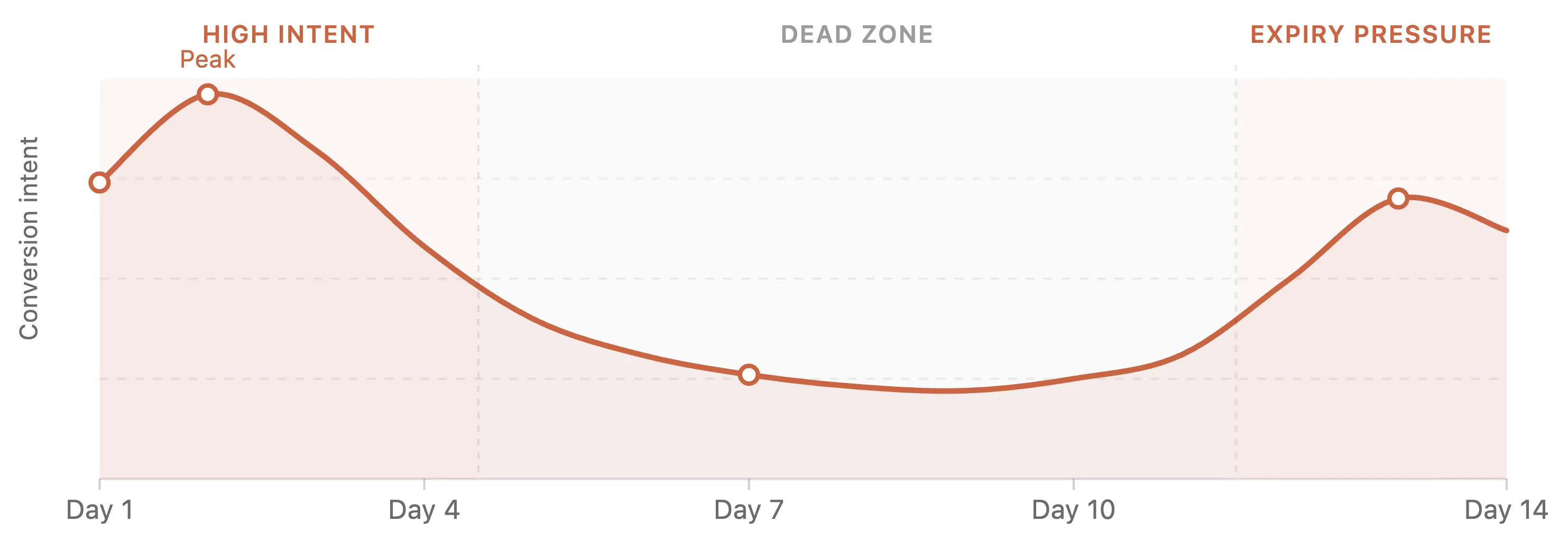
Relative conversion intent across a 14-day trial. Source: ChartMogul Go-to-Market Report.
This single data point reshapes how you should sequence any automation. Front-load activation help. Don’t spread a drip evenly across 14 days. A user who hasn’t activated by day three is already on a different path than one who activated on day one. The automation system needs to know the difference and respond accordingly.
For full benchmarks by trial model, see trial-to-paid conversion benchmarks in SaaS.
How decision automation works
Time-based drip sequences make a single decision once, before any user has signed up: everyone gets message A on day 1, message B on day 4, message C on day 7. No signal changes it.
Per-user decision flows evaluate each user at each moment based on what they’ve actually done. Someone who activated on day one follows a different path than someone who hasn’t logged in since signup. Someone who visited pricing twice gets a different response than someone who has never found it.
The infrastructure is a rules engine: IF [user state] AND [condition] THEN [action]. The sophistication isn’t in the technology. It’s in choosing the right conditions.
For a standard 14-day SaaS trial, four to six rules cover most of the conversion improvement:
| User state | Condition | Action |
|---|---|---|
| Day 4, no activation | Activation event hasn’t fired | In-product survey: “What’s getting in the way?” |
| Just activated | Activation event fires for first time | Contextual next-step email (written for someone who just got value) |
| Visited pricing, not activated | Pricing page viewed before activation | In-app prompt: social proof or trial extension |
| High-value account signal | Company size > 50, 2+ teammates invited | Slack alert to sales rep with full context |
| Activated, no conversion, day 11 | Activation done, trial day 11, no subscription | Time-limited upgrade offer or “talk to us” prompt |
| Gone quiet | No login in 5 days | Re-engagement email referencing their specific last action |
Which rules matter most depends on where your drop-off is. If most users activate but don’t convert, the bottom half of the table is the priority. If most users never activate, start at the top.
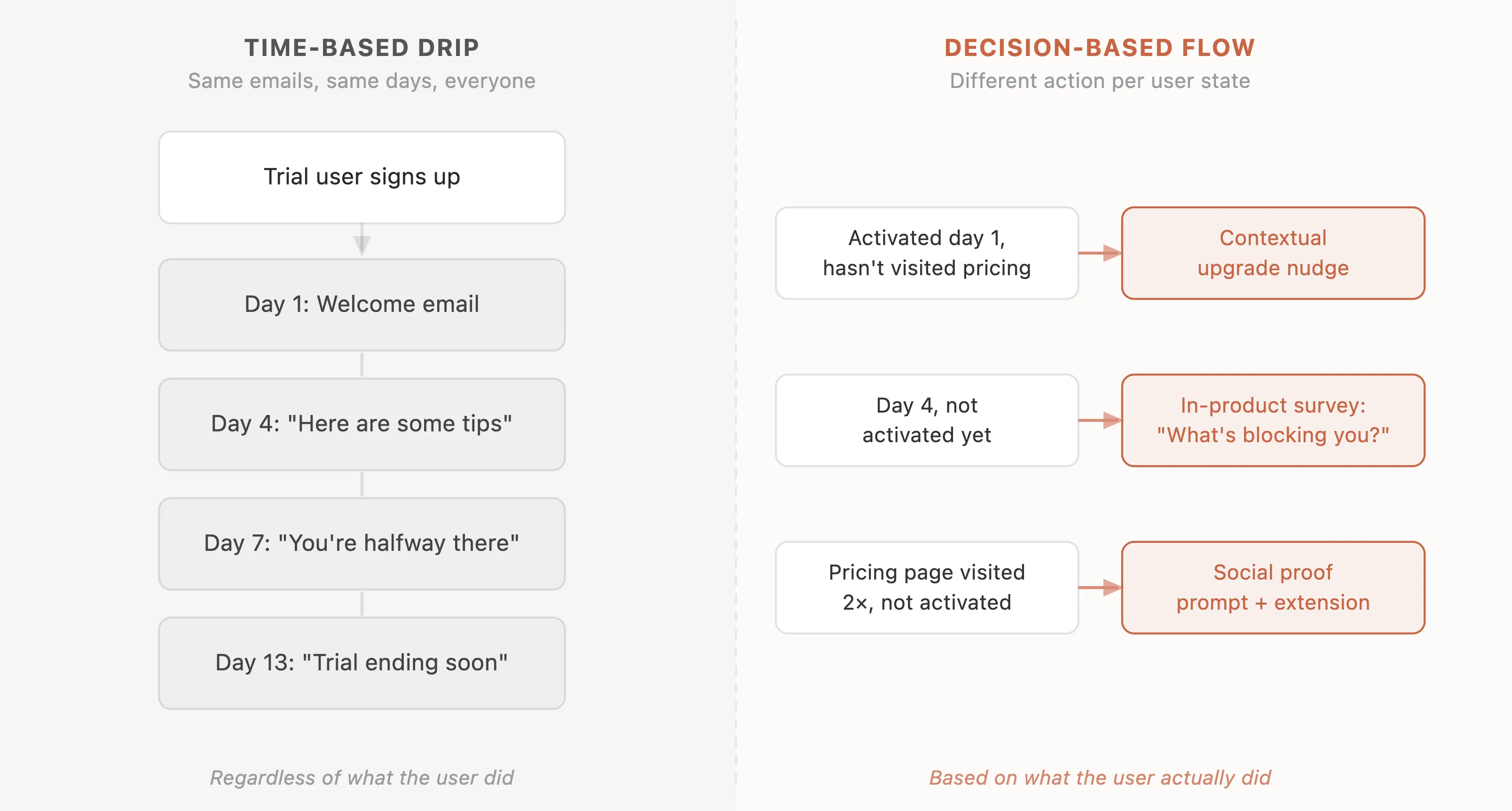
Time-based drips treat every trial user identically. Decision-based flows route each user based on their actual state.
Finding your activation milestone
This is the step most teams skip, and it’s why their rules don’t work. “User gets value from the product” is not a rule condition. “User has connected one integration AND run their first report” is.
Well-defined activation milestones from real companies:
| Company | Activation milestone | Retention signal |
|---|---|---|
| Slack | Team sends 2,000 messages | 93% likelihood of converting to paid |
| Dropbox | Uploads first file | Strong long-term retention predictor |
| Follows 10 accounts | Core engagement trigger | |
| Amplitude | Creates, names, saves first chart | Defines product value delivery |
| Asana | Creates a project, assigns one task | Multi-step activation event |
Slack’s 2,000-message milestone wasn’t intuition. It was discovered through retroactive cohort analysis: which early behaviors correlated with long-term retention? Once identified, every onboarding decision was built toward it. The framework for finding yours:
- List the in-product actions users take in their first week
- Compare retention rates of users who did vs. didn’t take each one
- Find the action with the largest retention gap
That’s your activation event. Without this step, a decision automation system is a rules engine with wrong rules.
The tool stack
Three-layer architecture is the standard:
| Layer | Common tools |
|---|---|
| CDP / event tracking | Segment, RudderStack, PostHog, Amplitude |
| Email / lifecycle | Customer.io, Loops, Encharge, Userlist |
| In-app messaging | Pulseahead, Intercom, Chameleon, Appcues |
Customer.io vs. Intercom is the most actively debated choice at the growth stage. Customer.io is purpose-built for event-based lifecycle messaging, handles millions of events per day, and segments in near-real time. Intercom is increasingly positioned as support-first with email automation as an add-on. Many teams keep Intercom for in-app chat and route email triggers through Customer.io.
PostHog and RudderStack are gaining ground as cost-effective alternatives to Segment plus Amplitude, particularly for teams where Segment’s per-event pricing becomes a problem at scale.
For in-product survey triggers (the day-4 non-activation check, the pricing-page prompt, the re-engagement at day 11), Pulseahead is built for exactly this layer inside SaaS products without requiring engineering each trigger from scratch.
The complaint that cuts across all of these tools: the stack is still fundamentally DIY. Wiring them together correctly requires engineering time. For a stage-by-stage look at which tools fit which PLG use case, see best customer feedback tools for PLG.
What has actually moved trial conversion
Email deliverability fix: 6% to 24%. Separate transactional and marketing email streams. Configure DKIM/DMARC. Clean the list. Do this before building anything else. Behavioral triggers that land in spam have zero value.
Credit card requirement: higher conversion rate, lower signup volume. ChartMogul: opt-out trials (credit card required) convert at ~30% vs. ~5-6% for opt-in. The ratio looks compelling until you account for the other side: requiring a card reduces the number of people who start a trial in the first place. 1,000 opt-in starts at 6% = 60 customers. 250 opt-out starts at 30% = 75 customers. The net gain is real in some funnels, marginal in others. Run the math on your own numbers before switching models.
Behavioral triggers over broadcast: 4x conversion, directional. Multiple sources converge on 4x conversion and 74% higher open rates from behavior-triggered email vs. scheduled sequences. The exact multiplier has no single controlled study behind it, but the direction is consistent enough across independent data points to treat as reliable.
CTA language: 104% increase in trial starts (Going.com). Going tested “Start Free Trial” vs. “Get Premium Access.” The value-framing variant doubled trial sign-ups. Top-of-funnel change, not a conversion flow change, but it shows that framing affects pipeline volume before automation has a chance to fire.
Activation milestone definition: Slack’s 2,000 messages. No single lift number is public, but defining the milestone is what made everything else measurable and improvable. From $0 to $7B in under five years with activation engineering as a core lever.
Build the diagnostic layer first
Most teams improve the automation layer first. Better sequences, in-app nudges, a new onboarding tool. Conversion moves a little. They conclude automation has limited returns.
What they skipped is the layer that tells the automation what to do: direct signal from users during the trial, not inferred from behavioral data but stated by the user.
An in-product survey at day four, shown to users who haven’t activated, asking what’s getting in the way, returns information no cohort analysis produces. Users who haven’t activated because they’re too busy, users stuck on a confusing setup step, and users who’ve quietly decided the product isn’t right for them look identical in your feedback analytics. They need three different responses. The survey is how you tell them apart. A trial-to-paid conversion survey built for this moment gives you that signal without a separate research effort. For setup friction specifically, an onboarding completion survey run in parallel surfaces which steps users abandon before they reach activation.
Surveys are the diagnostic, not the treatment. They reduce uncertainty about why users don’t convert, which is what makes every other part of the system accurate. For the full playbook on using this feedback, see how to use feedback from trial users to improve conversion.
Build the feedback loop before optimizing the automation. The answers it surfaces will change which rules you build, and the rules built on stated reasons outperform the ones built on inference alone.
If you’re running in-product surveys during trials, trigger them at moments of natural friction rather than waiting until trial end. A user who hits a confusing step on day two gives better diagnostic information than one surveyed a week later about a frustration they’ve already half-forgotten.
Frequently Asked Questions
What is decision automation for trial-to-paid conversion flows?
Decision automation for trial-to-paid conversion flows is a rules-based system that evaluates each trial user's actual in-product state and routes them to the right action at the right moment. Instead of sending the same time-based email sequence to every user, it applies conditional logic: IF user state AND condition THEN action. A user who activated on day one receives a different message than one who hasn't logged in since signup, even if both are on the same calendar day of their trial.
How is decision automation different from a time-based drip sequence?
A time-based drip sequence fires messages based on elapsed days (day 1, day 4, day 7) regardless of what each user has done. Decision automation evaluates user state at each trigger point and selects the appropriate action based on actual behavior. The same calendar day can produce a contextual upgrade nudge for one user, an in-product survey for another, and a re-engagement email for a third.
What rules should I start with for a 14-day SaaS trial?
Four to six rules cover most of the conversion lift: (1) Day 4, no activation: in-product survey asking what's in the way. (2) Just activated: contextual next-step email. (3) Visited pricing before activating: social proof or trial extension prompt. (4) High-value account signals (company size, teammates invited): sales rep alert. (5) Activated but no conversion by day 11: time-limited upgrade offer. (6) No login in 5 days: re-engagement email referencing their last action. Which rules matter most depends on where your drop-off actually is.
What is an activation milestone and why does it matter for decision automation?
An activation milestone is the specific in-product action or sequence of actions that reliably predicts a user will convert and retain. Without it, your rules engine has no anchor and every condition is a guess. Slack's was teams reaching 2,000 messages. Dropbox's was uploading the first file. To find yours: list in-product actions from the first week, compare retention rates of users who did vs. didn't take each one, and identify the action with the largest retention gap. That's your activation event.
What tool stack do most SaaS teams use for trial conversion automation?
Most teams use a three-layer stack: a CDP or event tracking layer (Segment, RudderStack, PostHog, Amplitude), an email and lifecycle layer (Customer.io, Loops, Encharge, Userlist), and an in-app messaging and survey layer (Pulseahead for in-product surveys, Intercom for in-app chat, Chameleon or Appcues for guided tours). Customer.io is the most commonly recommended for event-based lifecycle email at scale. For the in-product survey triggers (the day-4 non-activation check, the diagnostic survey, the re-engagement prompt), Pulseahead handles targeting, timing, and response collection inside the product without custom engineering.
Should I build a diagnostic layer before optimizing my automation?
Yes, and most teams get this backwards. Behavioral data tells you what users did; it doesn't tell you why. Users who haven't activated because they're too busy, confused by the UI, or already convinced the product isn't right look identical in event data. An in-product survey at day four, shown to non-activated users, is how you tell them apart. The survey is the diagnostic, not the treatment. Build the feedback loop first. The answers will change which rules you build, and rules built on stated reasons outperform rules built on inference.
Free 30-minute call
Working on trial conversion at your SaaS?
I'm doing a handful of free calls to understand how teams are approaching this. Book a free 30-min call to share what's not working. I'll share what I'm learning across companies in return. No pitch, no product to sell.