

A low survey score is not the end of the story. It is the moment the user is still present, still willing to tell you what went wrong, and still close enough to the product for the issue to be specific.
That moment is too useful to end with “Thanks for your feedback.”
When someone gives a low NPS score, a poor rating, a cancellation reason, or a frustrated open-text answer, the survey should help them move somewhere useful. Support. A success conversation. A product call. The right doc. Cancellation help if that is what they need.
The goal is not to automate empathy or turn every complaint into a workflow. The goal is simpler: ask one or two useful questions, understand the rough shape of the problem, and route the respondent to the next best intervention before the context goes cold.
Unhappy Survey Responses Need a Next Step
Negative feedback is easy to collect and hard to act on. A user gives you a 2 out of 5 rating after setup, writes “I cannot get the integration working,” and disappears. Two weeks later, the team reviews responses and decides setup needs improvement.
Useful? Yes.
Late? Also yes.
If you are trying to catch churn before it happens, the timing of the response matters as much as the response itself. A detractor is not just a reporting segment. A cancellation reason is not just a chart label. A frustrated open-text answer is someone telling you where the product relationship is breaking.
The weak version of this workflow sends everyone the same message: “Sorry to hear that.” That sounds polite, but it does not help much. A user stuck on billing needs a different path from a user confused by onboarding. A user asking for a missing workflow needs a different path from a user ready to cancel because support has been slow.
A better survey flow treats the negative answer as a routing signal. In Pulseahead, that can mean combining adaptive-flow with call-to-action step to smartly route the respondent to the next best intervention before the context goes cold.
The Common Negative Paths Worth Routing
Not every unhappy respondent needs the same intervention. Start by separating the signal from the next step.
| Signal | Likely user state | Better next step |
|---|---|---|
| Low NPS or rating | Broad dissatisfaction | Ask why, then route to support or success |
| Cancellation intent | Account risk | Send to retention help, cancellation help, or a success conversation |
| ”Confusing setup” theme | Onboarding friction | Offer a PM, research, or onboarding call |
| Repeated bug or friction complaint | Product issue | Link to support, a bug report form, or a known issue page |
| Documentation complaint | Self-serve failure | Send to the exact help doc or support path |
| Enterprise or high-value user frustration | Relationship risk | Route to the CSM, account owner, or success lead |
The tradeoff is worth thinking through before you build the survey. A support link is fast and practical when the issue is concrete. A booking link is slower, but better when the answer needs discovery. A docs link is lightweight and respectful when the user probably just needs instructions. A cancellation-help path can be useful, but only when the user has clearly signaled they are evaluating cancellation.
For example, a churn exit survey can be extended to route pricing concerns toward a success conversation, missing feature feedback toward a product call, and technical issues toward support. An onboarding completion survey can be extended to route setup confusion to a help doc or guided call. An integration blocker survey can be extended to route import failures or integration setup problems to the support path that can actually resolve them.
This is where the call-to-action step becomes the action layer. The CTA button can point to support, Calendly, Cal.com, a help doc, a bug report form, or a cancellation-help page. The survey collects the signal. The CTA moves the user somewhere useful.
Connect with your unhappy users with a smart survey flow.
Do Not Route Everyone to Support
Support is the right destination when the user has a solvable issue: an error, access problem, billing confusion, import failure, or setup blocker. In those cases, the best thing you can do is reduce the distance between the complaint and the person who can fix it.
But support is not the right bucket for every negative answer.
If a respondent says the product “does not fit our workflow,” support will not resolve that in a ticket. A product manager or researcher needs to understand the workflow. If someone says “I do not know where to start,” a focused help doc or onboarding path may be better than a queue. If an enterprise buyer says “we are not seeing enough value,” the right next step may be a success conversation, not a generic support form.
The failure mode is obvious once it happens. Every detractor gets routed to support, support gets flooded with vague product discovery conversations, and the team still does not know which problems are urgent.
Use support when the user needs help. Use product calls when the team needs context. Use docs when the user needs instruction. Use success paths when the account is at risk.
Later, response tags and response sentiment can help you see which negative themes deserve their own routing path. If “setup confusing” keeps appearing inside negative responses, do not keep routing those users to the same generic support link. Turn it into an explicit choice in the next version of the survey.
Designing the Survey Flow Before the CTA
A CTA works best after the survey has captured enough context to choose the right destination. If you show the button too early, you are guessing. If you ask too many questions first, the user drops off.
Use a short flow:
- Start with the signal question. Use NPS, a 5-point rating, or a choice question that captures the negative state.
- Use Adaptive Flow to branch unhappy users into a follow-up path.
- Ask one clarifying question. A long-text question works for context. A choice question works when you already know the likely reasons.
- Use Adaptive Flow again from the clarifying step to show a CTA only when the answer is worth acting on or of interest to the team. That might be a specific choice, a phrase in a long-text answer, or a support keyword.
- End cleanly with a thank-you note, message, or clear CTA so the respondent does not feel dropped into a random link.
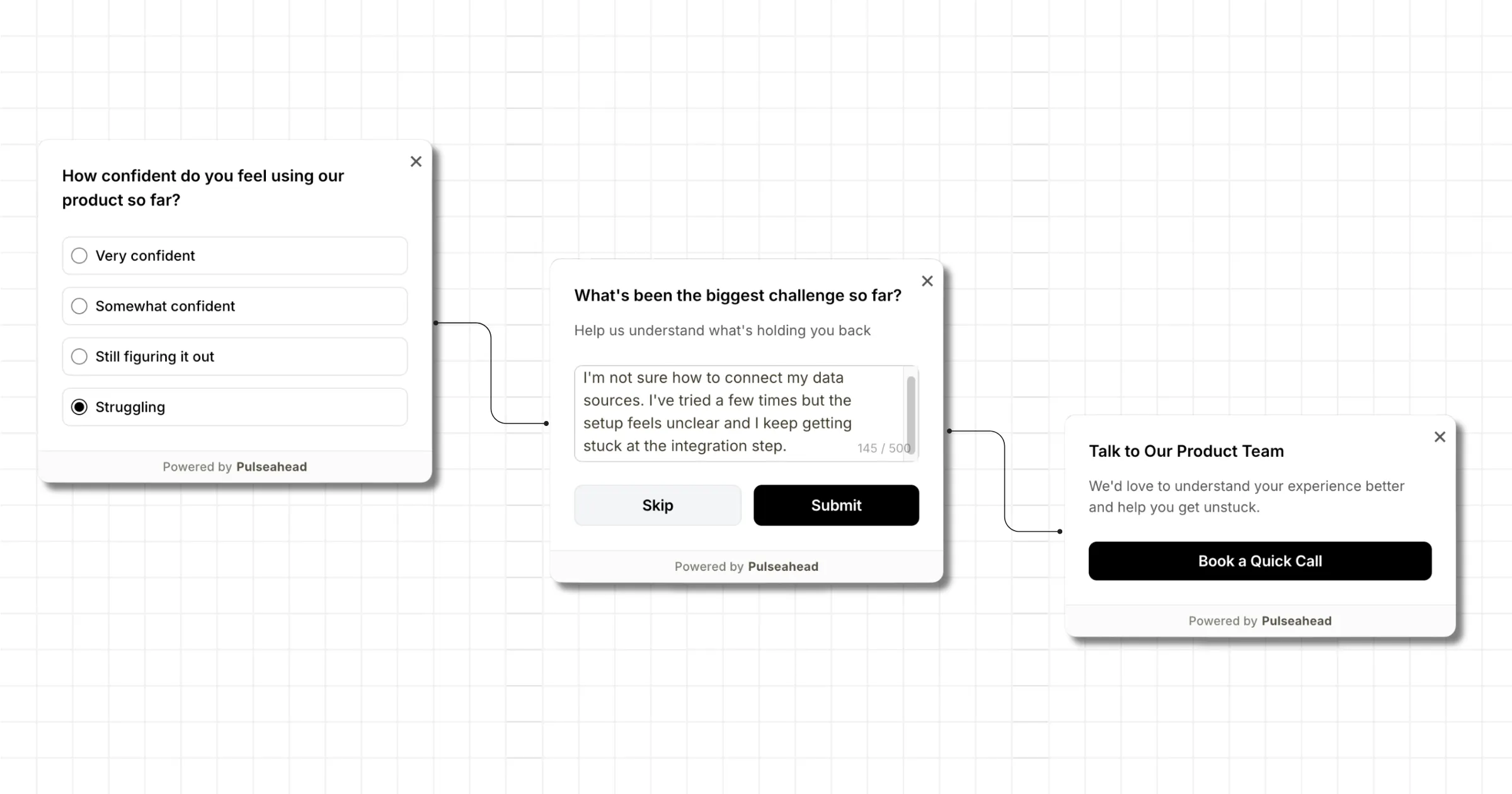
CTA Step Example using Pulseahead
Here are three simple patterns:
| Starting signal | Clarifying step | CTA condition | CTA |
|---|---|---|---|
| Rating 1 or 2 | ”What went wrong?” | Answer contains a support keyword | Connect with support |
| NPS 0 to 6 | Reason choice: “Setup was confusing” | Reason matches the theme you want to understand | Book a 20-minute product call |
| Cancellation reason: missing feature | ”What workflow were you trying to complete?” | Answer mentions a workflow worth probing | Talk to product |
The specific question types matter less than the order. First, identify the unhappy path. Second, collect enough detail to avoid a blind handoff. Third, decide whether the answer deserves a CTA at all. Fourth, send only those respondents to the destination that matches the problem.
If you are building this in Pulseahead, the Steps & Question Types reference covers NPS, rating, choice, long text, CTA, and thank-you steps. The survey builder is where those steps come together into a short multi-step flow.
Using Tags and Sentiment to Improve Future Routing
There is one important boundary to keep clear: Pulseahead does not automatically branch a live respondent based on AI-detected themes from an open-text answer.
That is a good thing. One sentence can be messy. “Setup was confusing and pricing feels high” could mean onboarding friction, value confusion, billing concern, or all three. If you route that automatically in real time, you can easily send the user to the wrong place.
The stronger workflow is slower but more reliable. Collect the open-text feedback, use AI-assisted tags and sentiment to spot recurring negative themes, then update the next version of the survey around explicit answers.
Before:
Every low rating routes to the same support CTA.
After:
The team sees repeated negative themes around setup, pricing, bugs, and missing workflows. The next survey adds a reason-choice step with those options. Each option routes to a better CTA.
| Explicit reason | Better CTA |
|---|---|
| Setup was confusing | Book onboarding help or open the setup guide |
| Pricing concern | Talk to success |
| Bug or broken workflow | Connect with support |
| Missing workflow | Talk to product |
Themes are better used to redesign the next version of the survey than to guess intent from one vague sentence. That is how AI-assisted analysis becomes operational without pretending it can read a respondent’s mind in the moment.
Writing the CTA Step
Once the routing path is set, the CTA step has one job: make the next action obvious. In Pulseahead, use the message, description, and button label to explain why the link exists, where it goes, and what kind of help the respondent can expect.
A support path might look like this:
| CTA field | Example copy |
|---|---|
| Message | Let’s get this fixed |
| Description | Share the details with support so they can help with the issue. |
| Button | Connect with support |
A product or research path might look like this:
| CTA field | Example copy |
|---|---|
| Message | Let’s talk through the workflow |
| Description | Book a quick call so we can understand what went wrong and help you move forward. |
| Button | Book a 20-minute call |
On paid plans, Pulseahead’s markdown support for survey steps can help you add links or structure inside the CTA description without making the screen too long. The Message Box and CTA step update gives more context on how those step types fit into guided survey flows.
Connect with your unhappy users with a smart survey flow.
The Best Routing Flows Feel Helpful, Not Defensive
The CTA should feel like help, not damage control.
That means the copy matters. “Before you leave…” can work in a real cancellation flow, but it feels needy after a simple low rating. “Connect with support” is better when the user needs help with a concrete issue. “Help us understand your workflow” is better when the answer points to product discovery.
Keep the survey short. Use the user’s answer to choose the next step, but do not turn one bad rating into an interrogation. The strongest flow captures the problem, gives the user an immediate path forward, and gives the team better evidence for what to fix next.
That is the real point of routing unhappy respondents. You are not hiding negative feedback, smoothing over complaints, or trying to save every account with a button. You are making feedback operational while the user is still engaged.
Start with one path. Low rating to one clarifying question to one useful CTA. Once the pattern works, use feedback analytics, tags, and sentiment to decide which negative themes deserve their own route.
That is how an in-product survey becomes more than a measurement tool. It becomes the first step in the intervention.