

Launching a product is exhilarating, but it’s also the beginning of your real work. The days and weeks after your release are critical. Users are actively experiencing what you’ve built, and their feedback can make or break your trajectory. The challenge is knowing what to ask them to uncover actionable insights instead of generic praise or vague complaints.
This article walks you through the specific questions that matter most post-launch, why timing and delivery method are everything, and how to close the loop so users know their input actually shapes your product.
The Real Problem With Post-Launch Feedback
Product teams face a universal friction when gathering post-launch feedback. Teams often ask the wrong questions, send them at the wrong time, or channel feedback through tools that users ignore (like email surveys). According to research from product management communities, only around 10% of teams report being satisfied with their feedback collection process, even though over 50% of new features come directly from customer input.
The deeper issue: vague feedback that arrives weeks after launch. When a user responds to an email survey days later, they’ve forgotten the exact moment they felt frustrated or delighted. Context fades. Honesty wavers. You get surface-level responses that sound nice but don’t guide action.
Reddit discussions from product managers reveal a recurring pain point: teams collect feedback but don’t know how to parse it into priorities. Some feedback reflects genuine friction, while other feedback is users proposing solutions rather than describing problems. The gap between useful feedback and noise is where most product teams lose momentum.
The Three Questions That Matter Most
After launch, ask yourself three things before you ask your users anything:
What are you trying to learn? Are you validating that a specific feature works as intended? Are you checking if users even found the new capability? Are you hunting for churn risks? Each answer requires a different question.
When should you ask? Timing dramatically affects response quality. Ask about a feature immediately after users interact with it. The memory is fresh. The context is real. Ask too late, and the experience has already been internalized (or forgotten).
How should delivery happen? In-app surveys get higher response rates than email.
Tools like Pulseahead allow you to embed feedback collection directly where users experience your product, dramatically improving completion rates and honesty.
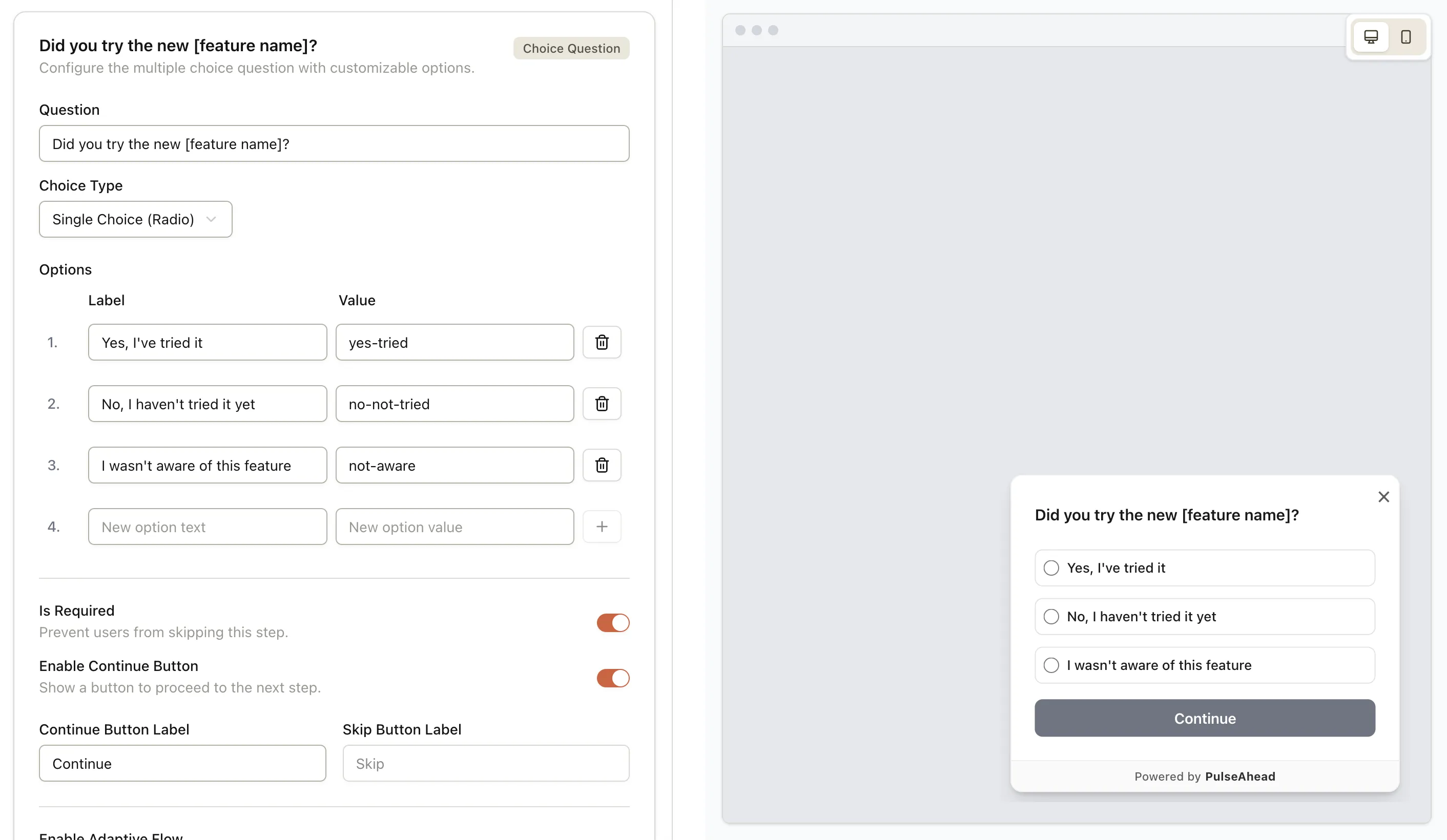
Using Pulseahead, you can quickly build and customize your post release feedback survey
With that foundation, here are the specific questions to ask:
On Feature Usability and Discovery
“Did you notice the new [feature name]?” This seems basic, but it’s critical. If 40% of users say no, you have a discovery problem, not a product problem. Many post-launch failures stem from features being invisible, not from features being broken.
“How easy was it to understand what [feature name] does?” Use a scale (1-5 works well). Complement this with an open-ended follow-up: “What confused you about it?” Usability gaps emerge fast here, and early insight means faster fixes.
“Did [feature] help you accomplish your goal today?” This validates whether the feature actually solves the problem you intended. A user might understand the feature perfectly but find it doesn’t fit their workflow. That’s gold-level feedback because it points to a real mismatch.
On Value and Impact
“What’s the one thing you’d change about [feature]?” Open-ended questions surface concerns you didn’t anticipate. Users often mention friction you couldn’t predict during development. Patterns emerge when you see this same response from 10+ users.
“How likely are you to use this feature regularly?” A simple 1-10 scale (or “Yes/No/Maybe”) forecasts adoption. If adoption scores are low, dig deeper with: “What would make you use it more often?”
“Did this release affect your likelihood to stay with us?” Honest answer to this question signals whether you moved the needle on retention. A feature might work great but might not matter for churn risk. Context matters.
On the Bigger Picture
“How would you rate your overall experience with our product right now?” NPS-style scoring (0-10) benchmarks sentiment. Track this over time. Detractors (scores 0-6) deserve immediate follow-up: “What’s your main concern?” Promoters (9-10) are candidates for case studies and referrals.
“Are there features you wish we had?” This feeds your roadmap. When you see patterns in requests, you’ve found your next sprint. Even more valuable: “What problem were you trying to solve when you thought of that feature?” The context transforms feature requests into problem statements.
“Did you encounter any bugs or glitches?” Give users an easy way to report technical issues immediately. A single critical bug experienced by 20 users could derail adoption. Catching it early means faster fixes and happier users.
Know your users better. Build what they love.
Timing and Delivery Transform Response Quality
The channels and timing you choose make a bigger difference than you’d expect. Research from product teams shows that in-app surveys capture 3-5x higher response rates than email surveys, because users respond in the moment, in context, and without friction.
Immediate feedback (within seconds of completing a key action) works best for:
- Feature usability questions
- Discovery and discoverability checks
- Specific interaction feedback
Delayed feedback (24-48 hours after key milestones like onboarding) works better for:
- Overall satisfaction and value assessment
- Adoption intent and future usage
- Longer-term impact questions
Avoid survey fatigue by setting re-engagement rules. Don’t show the same user a survey more than once every 30 days. If a user closes a survey without responding, respect that choice. Tools like Pulseahead allow you to set these behavioral triggers, so you collect feedback systematically without annoying users.
Also consider segmentation. New users and power users need different questions. A user on day 1 can’t assess long-term value. A user on day 60 shouldn’t be asked how they discovered your product for the first time. Targeted questions to the right segments yield more actionable data.
How to Structure Your Feedback Loop
Asking questions is only half the work. The bigger value comes from closing the loop and showing users that their input matters.
Acknowledge and categorize. When a user submits feedback, send a brief thank-you in-app or via email. Then sort responses into themes: usability issues, feature requests, billing concerns, performance problems, etc. Pattern recognition reveals priorities.
Respond to detractors. If someone scores 0-6 on an NPS scale, someone from your team should reach out within 48 hours. Ask clarifying questions. Understand their friction. Often, a thoughtful response and quick fix converts a detractor into a promoter.
Close the loop publicly. When you implement a feature request or fix a commonly reported bug, communicate it. In-app announcements work well: “We heard you wanted dark mode. We shipped it. Check it out.” Users feel heard. Engagement increases. Future feedback participation improves.
Measure impact. Track what percentage of feedback led to action. If you’re collecting feedback but ignoring it, users will sense that and stop responding. Make feedback collection a real driver of roadmap decisions.
Avoiding Common Traps
Ask specific questions, not vague ones. “How was your experience?” generates useless responses. “Did [specific feature] help you complete your task?” generates answers you can act on.
Avoid leading questions. “Isn’t our new dashboard amazing?” biases responses. Instead: “How would you rate our new dashboard?” lets users respond honestly.
Don’t collect feedback just to collect it. Every question should serve a purpose tied to decisions you need to make or risks you’re monitoring. Extra questions dilute response rates and frustrate users.
Don’t forget to follow up on improvements. When users see that churn dipped after you shipped their requested feature, or that a reported bug was fixed, they become advocates. Silence makes them skeptical.
Why Post-Launch Feedback Drives Retention and Growth
Teams that systematically gather post-launch feedback reduce churn by 0.5-1% compared to those that don’t. Over a year, that compounds. NPS-driven companies also see 15% higher retention when they act on detractor feedback quickly.
The real opportunity: post-launch feedback is cheaper than pre-launch research. It’s real, not hypothetical. Users are already invested. They want your product to work because they’re using it. Leverage that.
Platforms like Pulseahead make it simple to run post-launch feedback cycles. Their flexible survey builder lets you customize timing, appearance, and targeting to fit your workflow. You can see NPS trends, read open-ended responses, and export data to share with your team, all without wrestling with manual processes.
Complex tools slow you down. Run feedback surveys in minutes.
Wrapping Up
Post-launch feedback isn’t a box to check. It’s the foundation of product-market fit. Ask the right questions at the right moment through the right channel, and you’ll uncover the gaps between what you built and what users actually need. Close the loop by acting on what you learn, and users become partners in your product evolution.
Start with the questions covered here. Pick the three or four that matter most for your current release. Set them to trigger in-app at the right moment. Then listen, learn, and iterate. That’s how products go from good to great.